Database Overview
This page exists because the individual domain pages (Financial, Stock, Clients, Patients, Medical, Operational) each explain their own tables well, but not how the domains connect to each other. Start here before writing your first cross-domain query.
The four entities everything hangs off
Almost every view joins back to one of these:
- pet — the patient. The clinical and demographic hub.
- users — the person (owner/client). Demographic and contact hub.
- clinics — the practice location.
- sale — the financial transaction. Everything money-related hangs off a sale.id.
A useful mental model: pet is the spine of clinical data, sale is the spine of financial data, and new_file_cases (the SOAP record) is the bridge between the two — it carries both a pet_id and a sale_id.
users vs clients — these are not the same view
This trips people up. There are two distinct views:
- users — person-level demographic data: name, email, phone, address. One row per person.
- clients — the clinic relationship record: owner_id (→ users.id), clinic_id, plus clinic-specific financial state like credit_balance, outstanding_balance, and loyalty_points.
If you only need contact info, use users. If you need a client's balance or loyalty points at a specific clinic, use clients joined to users on owner_id = users.id.
pet vs patients — same distinction, clinical side
- pet — the full demographic record: species, breed, birthday, chip number, weight, allergies.
- patients — the clinic-specific record: pet_id, clinic_id, and the Digitail patient number used on physical records/labels.
A pet can, in principle, be linked to more than one clinic; patients is what scopes a pet to a specific clinic and gives it that clinic's patient number.
Full Schema Reference
The diagram below covers the complete Digitail schema — every domain, every relationship — so you can see how the platform fits together beyond just the tables you personally have access to.
This is a reference diagram, not an access list.
Redshift access is granted per client, and not every clinic has the same set of views — some have more, some fewer, depending on what's been requested and enabled for that account. If you see a table here that looks useful but doesn't show up when you query it, that means it's not currently part of your grant, not that it doesn't exist. See All viewsAll views for your own confirmed access, and contact us if you'd like a table you see here added to it.
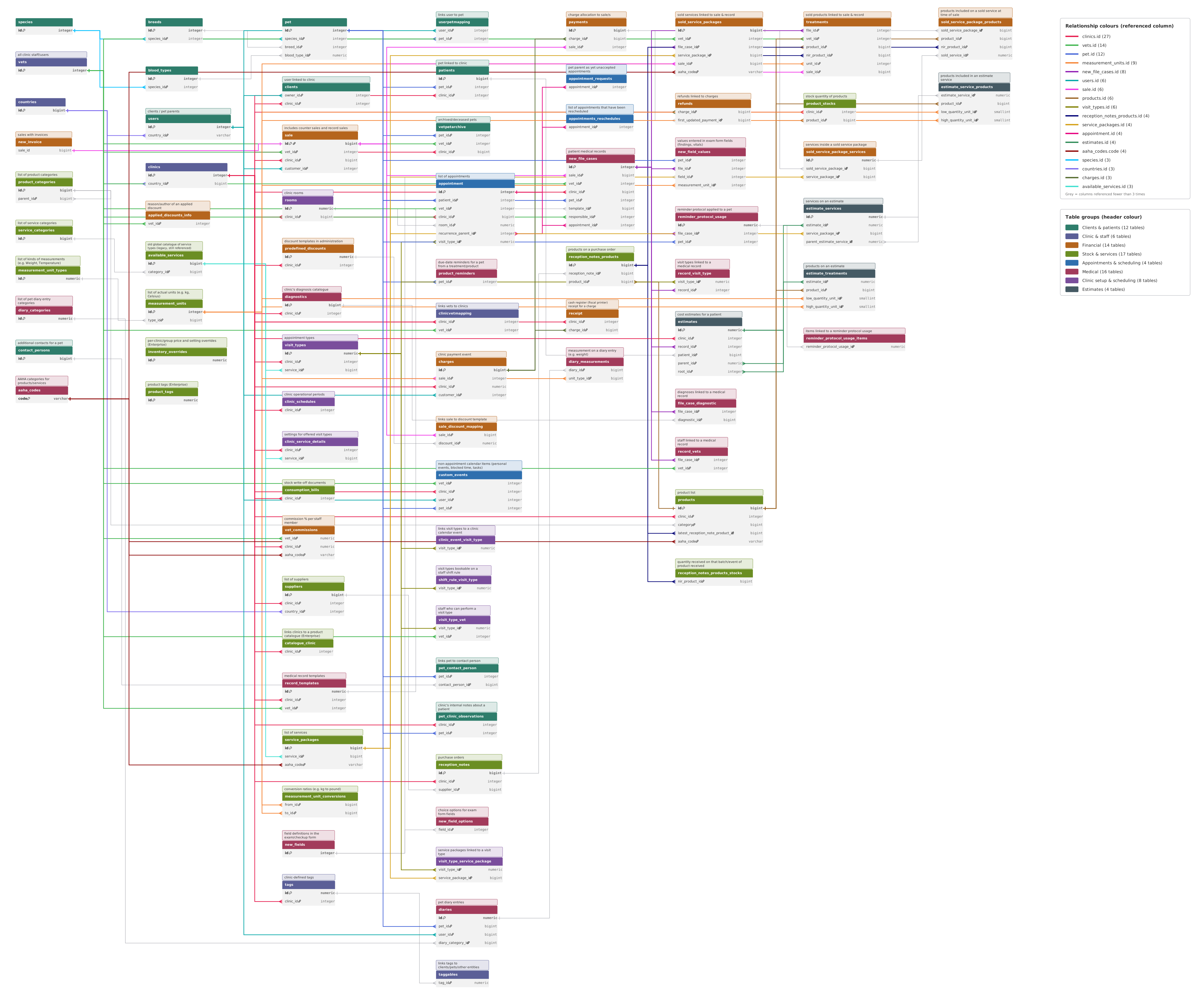
Reading the diagram
- Client → clinic path: users → clients → clinics. Use this when you need "who is this client at this practice."
- Pet → clinic path: pet → patients → clinics. Use this when you need "what's this pet's patient number at this practice."
- Clinical → financial bridge: new_file_cases is the only view holding both pet_id and sale_id directly, which makes it the join point when a question spans "what happened medically" and "what was charged for it."
- Money flow: sale → (treatments + sold_service_packages) for line items, sale → charges → payments for how it was paid, sale → new_invoice for the invoice document.
- Inventory link: a treatments row can reference a specific purchased batch via nir_product_id → reception_notes_products.id (see Stock & Services), which is what makes batch-level COGS and FIFO/FEFO analysis possible.
Naming quirks worth knowing before you join anything
What you'll see | What it actually is |
|---|---|
sale (singular) | The transaction table. Older internal docs call it "sales" — the view is sale. |
appointment (singular) | The appointment table — not appointments. |
appointments_reschedules | Correct spelling — not "reshedules." |
prescriptions | Correct spelling — not "presrciptions." |
product_stocks | Current on-hand stock. Singular batches live in reception_notes_products / reception_notes_products_stocks, which are internal tables, not exposed views — see the note in Stock & Services. |
A note on what's not on your access list
Not every table in the diagram above is granted to every client. If a query fails with a permission or "relation does not exist" error on a table you can see here, that's expected — check All viewsAll views for what's confirmed on your account and reach out if you want it expanded.